C# XmlSerializer无法创建文件或目录
现象:
在某一台XP机器上,时而正常,时而弹出无法创建文件或目录
错误具体信息:
在 System.IO.__Error.WinIOError(Int32 errorCode, String maybeFullPath)
在 System.IO.FileStream.Init(String path, FileMode mode, FileAccess access, Int32 rights, Boolean useRights, FileShare share, Int32 bufferSize, FileOptions options, SECURITY_ATTRIBUTES secAttrs, String msgPath, Boolean bFromProxy, Boolean useLongPath)
在 System.IO.FileStream..ctor(String path, FileMode mode, FileAccess access, FileShare share)
在 Microsoft.CSharp.CSharpCodeGenerator.GetResponseFileCmdArgs(CompilerParameters options, String cmdArgs)
在 Microsoft.CSharp.CSharpCodeGenerator.FromFileBatch(CompilerParameters options, String[] fileNames)
在 Microsoft.CSharp.CSharpCodeGenerator.FromSourceBatch(CompilerParameters options, String[] sources)
在 Microsoft.CSharp.CSharpCodeGenerator.System.CodeDom.Compiler.ICodeCompiler.CompileAssemblyFromSourceBatch(CompilerParameters options, String[] sources)
在 System.CodeDom.Compiler.CodeDomProvider.CompileAssemblyFromSource(CompilerParameters options, String[] sources)
在 System.Xml.Serialization.Compiler.Compile(Assembly parent, String ns, XmlSerializerCompilerParameters xmlParameters, Evidence evidence)
在 System.Xml.Serialization.TempAssembly.GenerateAssembly(XmlMapping[] xmlMappings, Type[] types, String defaultNamespace, Evidence evidence, XmlSerializerCompilerParameters parameters, Assembly assembly, Hashtable assemblies)
在 System.Xml.Serialization.XmlSerializer.GenerateTempAssembly(XmlMapping xmlMapping, Type type, String defaultNamespace)
在 System.Xml.Serialization.XmlSerializer..ctor(Type type, String defaultNamespace)
在 System.Xml.Serialization.XmlSerializer..ctor(Type type)
在 XonixERP.Common.AppConfigSetting.get_Config()
在 DLL.ERP.WinFormUI.ClassUtil.CreateInstance(Type type)
在 XonixERP.View.LogonForm.btnLogin_Click(Object sender, EventArgs e)
在 System.Windows.Forms.Control.OnClick(EventArgs e)
在 System.Windows.Forms.Button.OnClick(EventArgs e)
在 System.Windows.Forms.Button.OnMouseUp(MouseEventArgs mevent)
在 System.Windows.Forms.Control.WmMouseUp(Message& m, MouseButtons button, Int32 clicks)
在 System.Windows.Forms.Control.WndProc(Message& m)
在 System.Windows.Forms.ButtonBase.WndProc(Message& m)
在 System.Windows.Forms.Button.WndProc(Message& m)
在 System.Windows.Forms.Control.ControlNativeWindow.OnMessage(Message& m)
在 System.Windows.Forms.Control.ControlNativeWindow.WndProc(Message& m)
在 System.Windows.Forms.NativeWindow.Callback(IntPtr hWnd, Int32 msg, IntPtr wparam, IntPtr lparam)
原因分析:XmlSerializer 运行时所属的帐户或安全环境需要有访问temp 目录的权限
解决办法:
更改权限
1、若C盘是FAT格式,需要将TEMP目录,TMP目录迁移。若C盘是NTFS格式,可跳过此步。
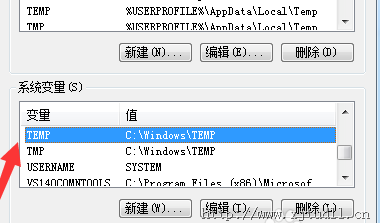
2、迁移到NTFS目录后,修改目录权限,允许登录的账户读写
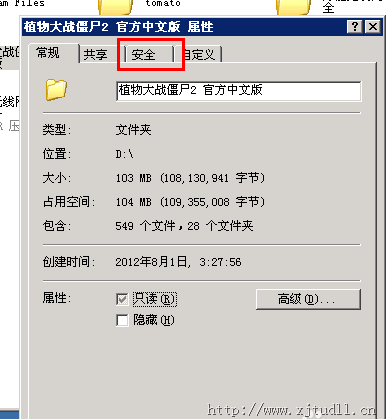
如果没有安全选项卡
点掉"使用简单文件共享",是取消掉它,而不是勾上,一定要注意这一点
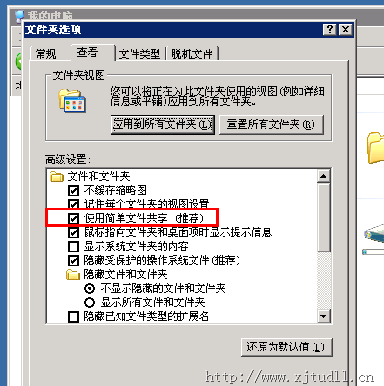
有没有发现,"安全"选项卡已经出来了