当前位置:首页 > 技术心得 > 正文内容

PlatformIO串口无输出

xjtudll1年前 (2025-02-04)技术心得6120

问题:

同样的串口打印代码,在Arduino IDE里可以正常输出,但是在PlatformIO里看不到任何输出

硬件:ESP32-S3 Camera

解决方法:

This is because DTR and RTS both are connected to the RESET pin and GPIO 0 of the esp 8266 chip, and by default in the terminal serial port in visual studio code DTR and RST pin of the the serial to usb adapter are active and prevent the chip to act as normal.
Solution:
In terminal serial port press CTRL + T and then CTRL + D to inactive DTR and then CTRL + T and then CTRL + R to inactive RST pin

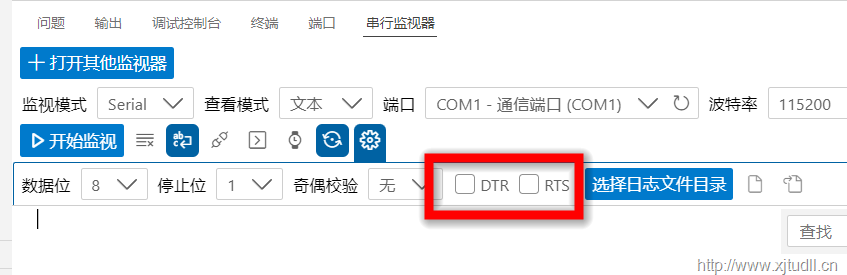
界面里操作如下(去掉DTR和RTS前面的√,即不勾选):
sshot-1

参考资料:

https://community.platformio.org/t/cant-get-output-from-serial-monitor/15533/18
扫描二维码推送至手机访问。

版权声明:本文由鸟的天空发布,如需转载请注明出处。

本文链接:http://www.xjtudll.cn/Exp/702/

标签: PlatformIO
分享给朋友:

“PlatformIO串口无输出” 的相关文章

SVN项目库错误Unsupported FS format svn: Expected FS format between '1' and '4'; found format '6'

SVN项目库错误Unsupported FS format svn: Expected FS format between '1' and '4'; found format '6'

问题: 利用SVN Dump版本库,命令行老是一闪而过 bat文件代码如下: cd .. F:\SubversionDB\websoft\svnserver\svnadmin.exe dump F:\SubversionDB\svn_repo\OSAL_51/ > f:/1.dump 这个ba...

C# 去掉小数点后面多余的0

1、使用TrimEnd()    decimal num1=(decimal)0.5;    //第一步将浮点数转换成字符串    string strNum=num1.ToString(); &nb...

Keil查看编译后的汇编代码

Keil查看编译后的汇编代码

在使用Keil编译C51时,一般情况下,大家都不去看汇编代码。但在某些特殊情况下,查看汇编代码就是有必要了。 (1)确认C代码是否正确 (2)研究算法 查看汇编代码前的某些准备工作是必须的:你得有工程,并确定程序编译无误。在查看汇编代码前,编译一次。 编译OK后,点Debug 有可能会提示你没有...

office每次打开word都要配置进度 解决

office每次打开word都要配置进度 解决

Office2013每次打开都提示要配置,如图所示: 当然等待一段时间后,文件还是能打开的。 这个很烦。 解决方法: 1、点击“开始”——点击“运行”——输入“regedit”回...

SQL Server数据库脱机时间太长(脱机联机)

解决办法:强制脱机语句:ALTER DATABASE <dbname> SET OFFLINE WITH ROLLBACK IMMEDIATE联机语句ALTER DATABASE <dbname> SET ONLINE...

NSToolBar-设定初始化选中的item

NSToolBar-设定初始化选中的item

参考资料: http://stackoverflow.com/questions/11004072/nstoolbar-how-do-i-initialise-with-a-selected-item 使用方法: -setSelectedItemIdentifier 举例如下: [self.win...

发表评论

访客

◎欢迎参与讨论,请在这里发表您的看法和观点。